One chat for two numbers: a test
Hibbem is an SMS app for Android that encrypts your texts end to end. Its newest feature is for people who carry SIMs from two countries: when someone texts you from both their numbers, you see one chat instead of two, and you choose which of their numbers you text, from which of your SIMs. That way every text can stay a local text. This page walks two testers through it, from installing to the combined chat.
What you need
- Two people, each with an Android phone (Android 10 or newer) that has two SIMs active, from two countries. One of you with a single SIM works too, but you'll see less.
- Hibbem 2.0.146 or newer on both phones.
- Hibbem becomes your SMS app while you test. Your other texts keep working as before, and you can switch back any time.
- About half an hour, and a few dozen texts. Everything goes by ordinary SMS, so texts cost what your plan charges, including texts abroad.
Below, the two testers are Alice and Bob. Each has a Dutch and an American number; read your own countries instead. The screenshots use made-up names and numbers.
1. Install Hibbem
Both of you
- Install Hibbem from Google Play's open test or from this site: Install on Android has the steps for both.
- Open it. A short introduction explains what Hibbem protects and what texts cost.
- Tap Set as default to make Hibbem your SMS app. If Android refuses, the install page explains how to allow it.
2. Create your identity
Both of you
- Tap Create new identity.
- Write the 24 words on paper, in order, and tap I wrote them down. Hibbem checks a few of them.
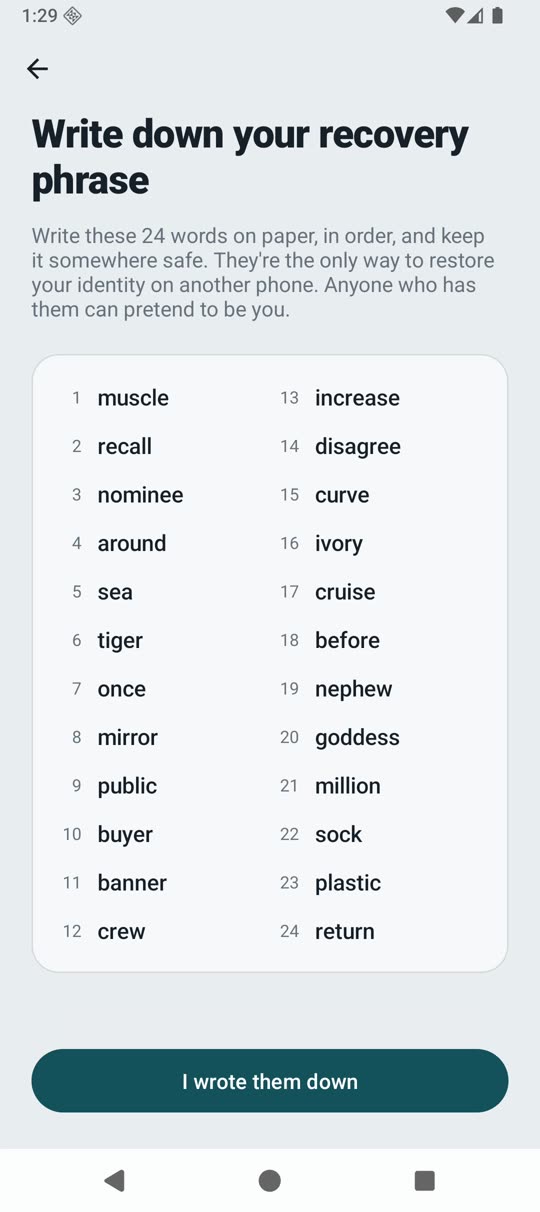
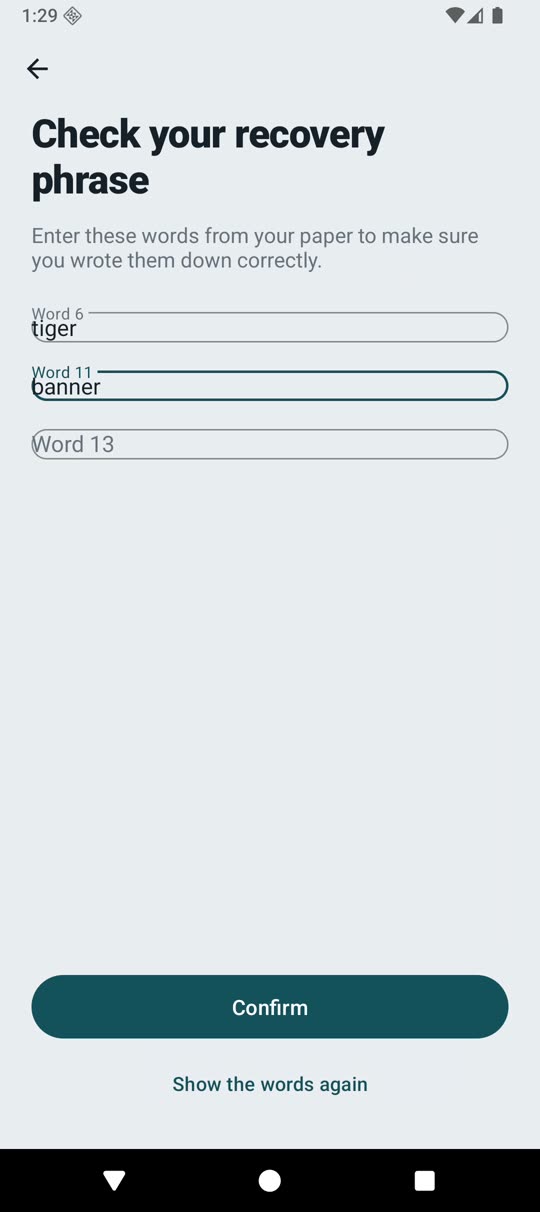
The words are your identity's only backup. Never post them or send them to anyone, us included.
3. Encrypt your chat
One of you starts, the other accepts
Set up encryption once, between one number each, for example Alice's Dutch number and Bob's Dutch number. The other numbers join in step 4.
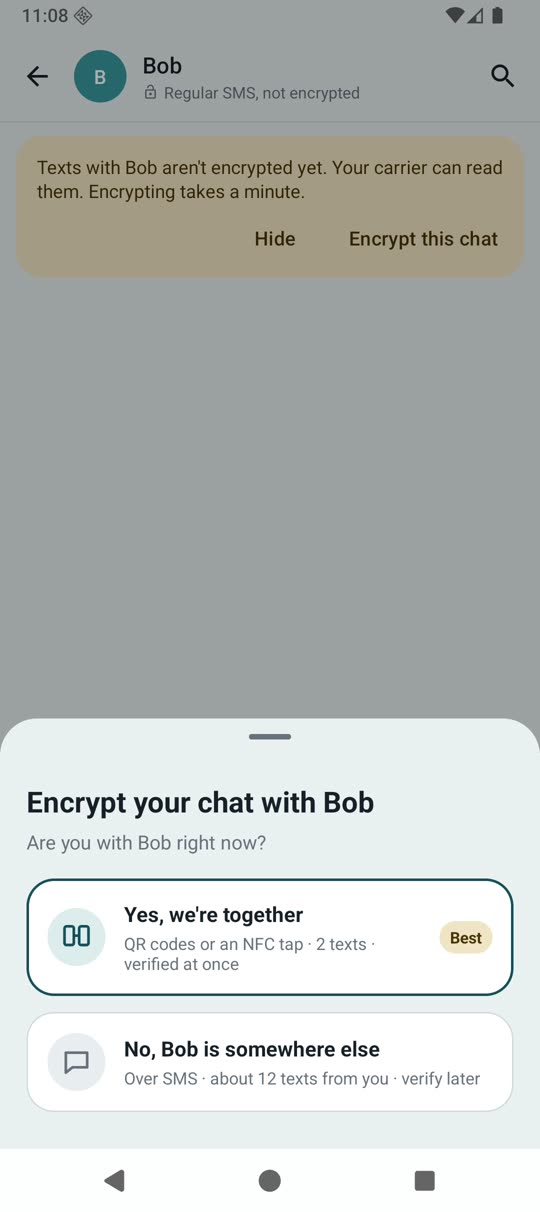
- Alice opens a chat with Bob's first number (send a normal text, or start a new chat) and taps Encrypt this chat.
- Hibbem asks: Are you with Bob right now?
- Yes, we're together: scan each other's QR code, tap the phones together (NFC) or use sound. Two texts, and the chat is verified at once.
- No, but we can share through another app: send the setup through another messaging app. One text from you.
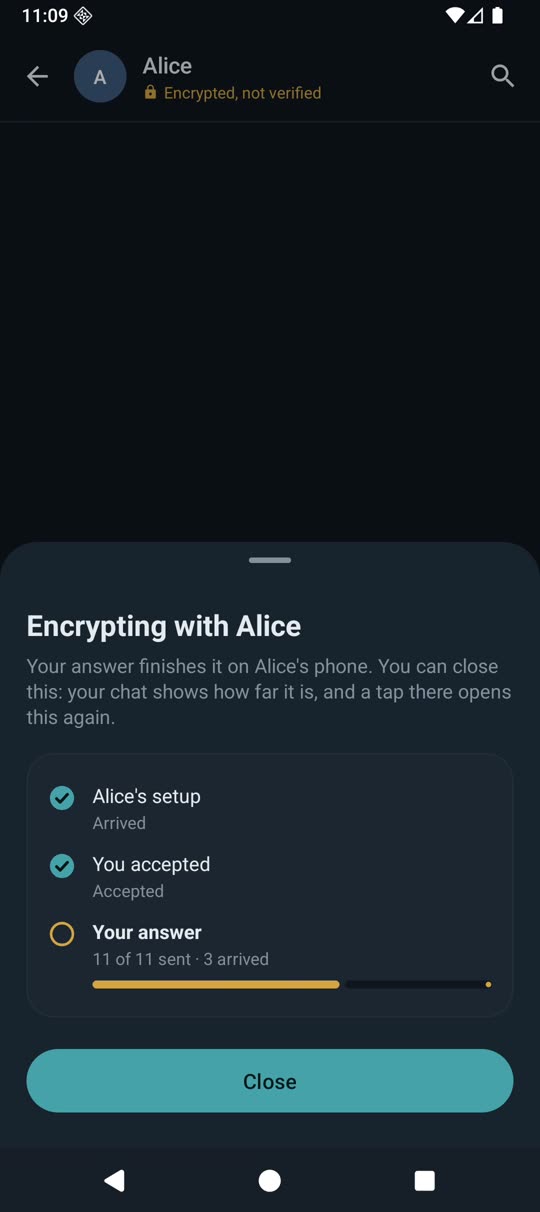
- No, Bob is somewhere else: everything over SMS, about 12 texts from you and 11 back. If it's off, turn on Set up encryption over SMS in Settings.
- Bob accepts on his phone. When the chat says Encryption is on, you're ready.
4. Text from your other SIM
Both of you, one after the other
Now each of you sends one message from your second SIM, so the other phone learns that number belongs to you.
- Bob opens his encrypted chat with Alice and presses and holds Send. The first time, Hibbem asks to see your SIMs: allow it.
- Under Which SIM for Alice? Bob picks his American SIM and sends a message.
- On Alice's phone it arrives in a new chat, from Bob's American number. A banner asks whether this number is Bob's. Check with Bob that it really is his (a call, or ask him in your encrypted chat), then tap Yes, it's theirs. From then on that chat is encrypted too.
- Now swap: Alice sends a message from her American SIM to Bob, and Bob taps Yes, it's theirs.
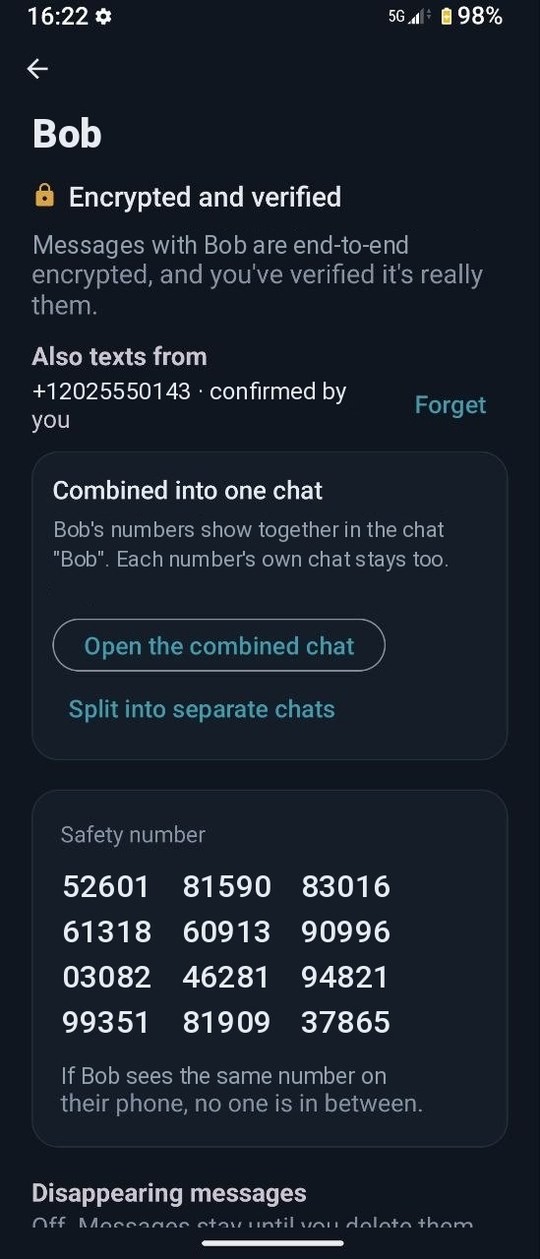
Under Contact security (tap the name at the top of a chat) you'll now see Also texts from with the other number, confirmed by you.
5. Turn on combining
Both of you
It's off by default, because most people have one number. Open Settings (the gear at the top of the chat list), go to Advanced and turn on Combine a contact's numbers. What it's for shows the explanation.
6. Combine the two chats
Both of you
- Open Bob's Contact security: tap his name at the top of the chat, or press and hold his chat in the list and choose Contact security.
- A card says Bob texts you from 2 numbers. Tap Combine into one chat…, read the explanation, and tap Next: how to text Bob.
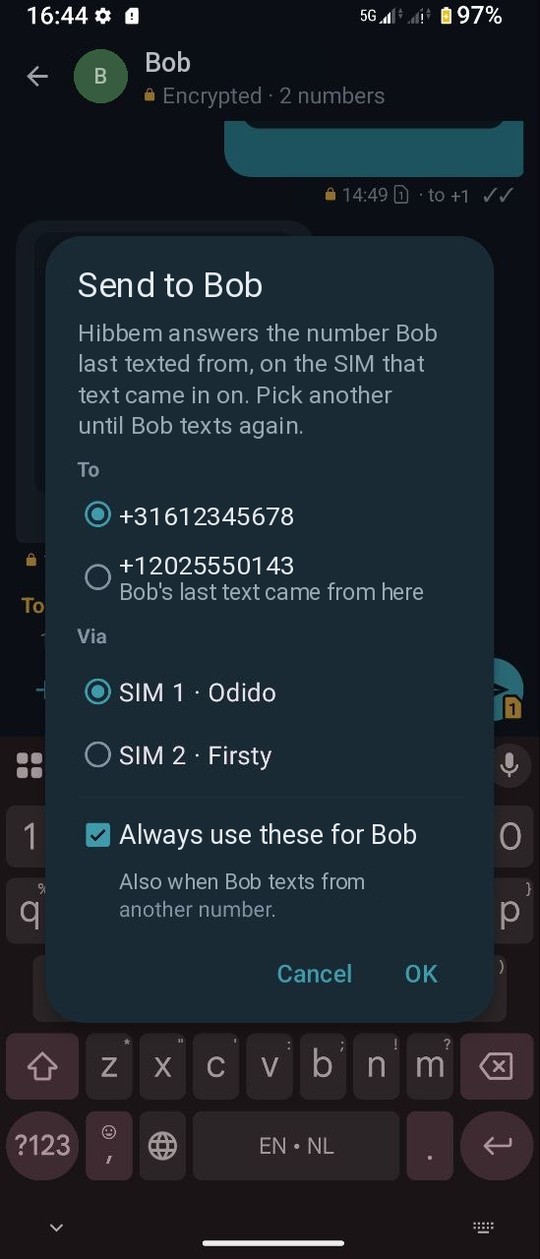
- Choose To (which of Bob's numbers you text) and Via (which of your SIMs it goes from). Leave Always use these for Bob ticked to keep that choice; untick it to answer whichever number Bob last texted from. Tap Combine.
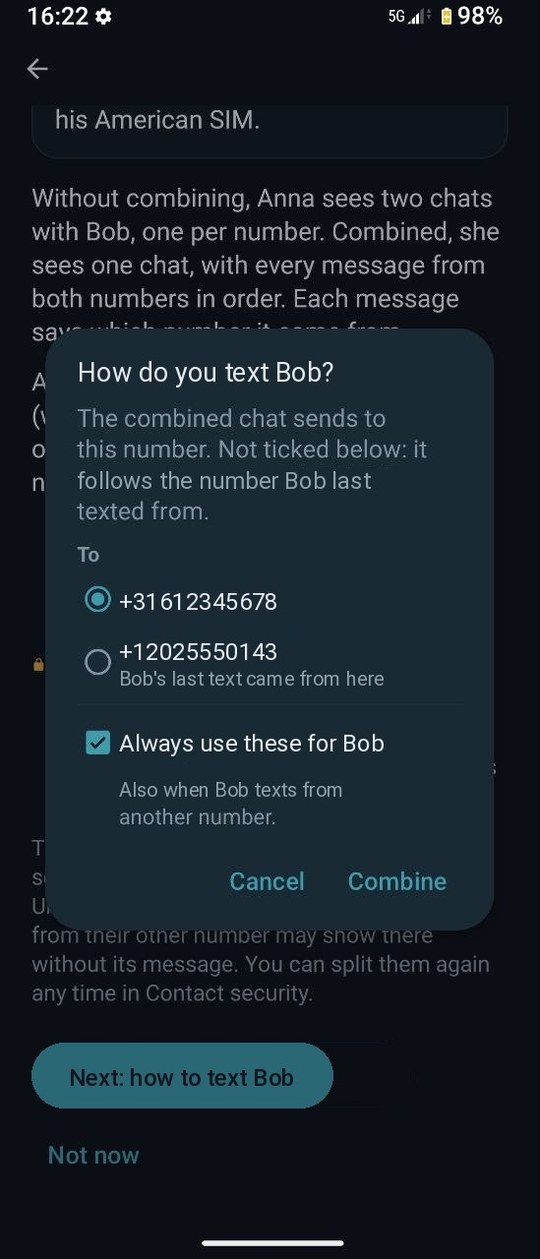
Do it on both phones. Combining only changes what your own phone shows. Until Bob combines Alice's numbers too, a reply or reaction to a message from her other number may show on his phone without the message it belongs to.
7. Use the combined chat
Both of you
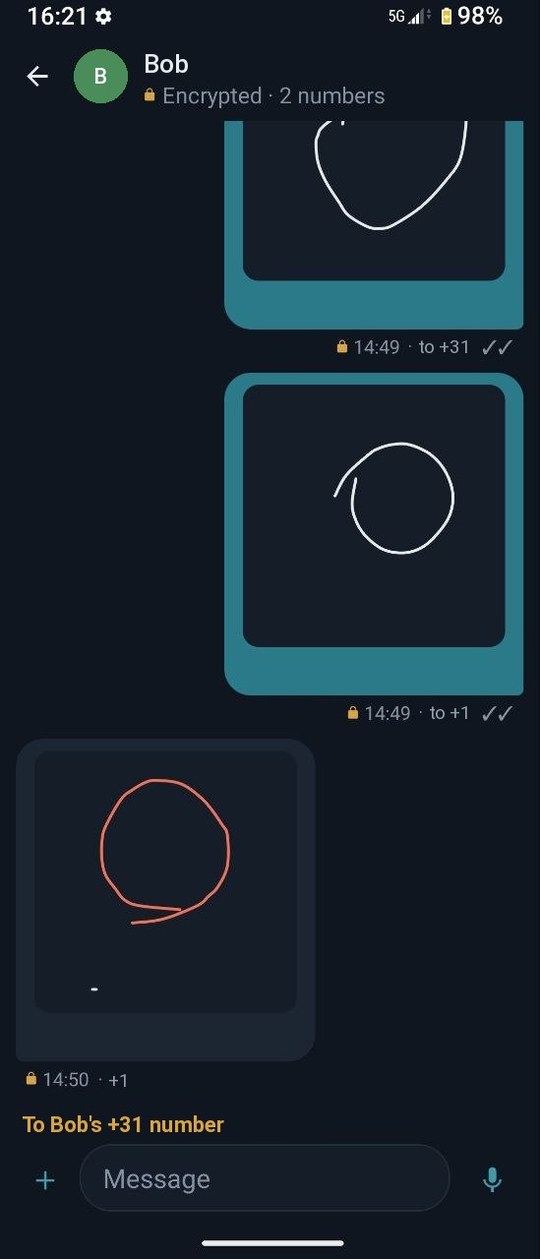
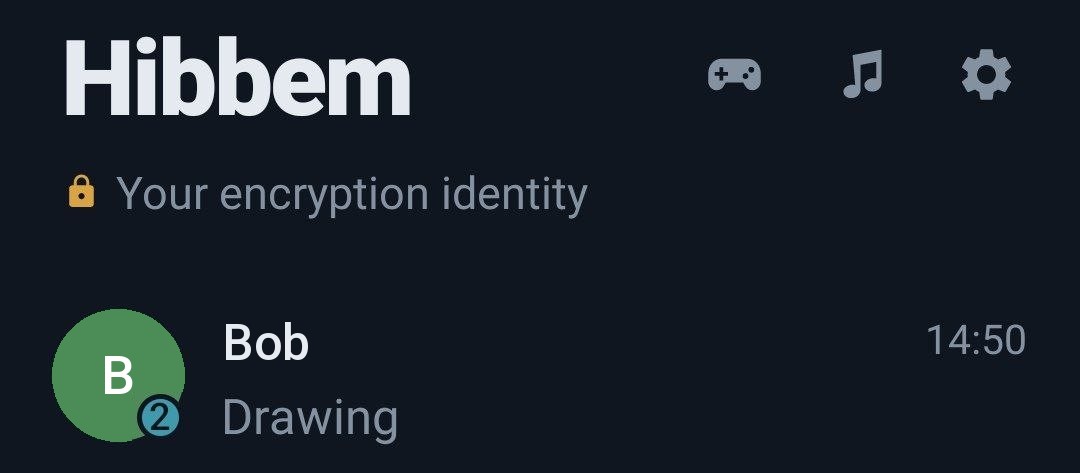
- The chat list shows Bob once, with a small 2 on his picture.
- Every message says which number it came from or went to (+31, +1, or the last four digits when both numbers are from one country).
- The line above the text field says where your next message goes, such as To Bob's +31 number. Press and hold Send to change it.
- Try what you'd normally use: texts, replies (swipe a message to the right), reactions (press and hold a message), voice notes (hold the microphone), and the + menu for drawings, secrets and lists.
- Want only the combined chat in your list? Settings → Advanced → Show only the combined chat.
To undo it: Contact security → Split into separate chats. Nothing is deleted, and encryption stays on.
What we'd like to hear
- Did your texts go to the number and from the SIM you expected, also after the other person texted from their other number?
- Was anything unclear: the explanation, the To and Via choice, the labels on the messages?
- Did a message show up late, twice, in the wrong place, or not at all?
- Would you use it? What's missing?
Reply where you found this page, or use Settings → Report a problem in Hibbem: it opens your email app with your Hibbem and Android version filled in. Please don't include your 24 words, your messages or anyone's phone number.