Install Hibbem on Android
Hibbem is in a test on Google Play that anyone can join. That's the easiest way to install it: the Play Store keeps it up to date, and Android doesn't ask you to allow anything extra. You can also download it from this site. For Android 10 and newer.
From Google Play (easiest)
- Join the group Hibbem test users with the Google account you use in the Play Store on your phone.
- Open Hibbem's test page and tap Become a tester.
- Tap the link to the Play Store there and install Hibbem. Open it and tap Set as default to make it your SMS app.
Already installed Hibbem from this site? Keep that one. The Play Store version is signed differently, so it can't install over it, and switching means uninstalling first, which deletes your identity and your messages. To switch anyway, make a backup first (Hibbem → Your identity → Backups) and restore it in the Play Store version; each chat then continues after one text each way.
Google needs testers who stay signed up for two weeks before Hibbem can be in the Play Store for everyone: joining helps, even with more than one Google account.
Or download it from this site
Android is careful with apps from outside the store that handle texts, so it asks you to allow a few things. The steps below walk you through them.
Download Hibbem for Android1. Install the app
- Tap the download button above and open the file when it's done.
- The first time, Android asks whether your browser may install apps. Tap Settings, turn on Allow from this source, and go back.
- Tap Install.
Google Play Protect may warn you while installing, because it doesn't know Hibbem's developer. Tap More details and then Install anyway.
2. Make Hibbem your SMS app
Android only lets your default SMS app read and send texts. Open Hibbem and tap Set as default.
On Android 15 and newer, an app installed from a downloaded file may not become the SMS app straight away. Android then shows this:
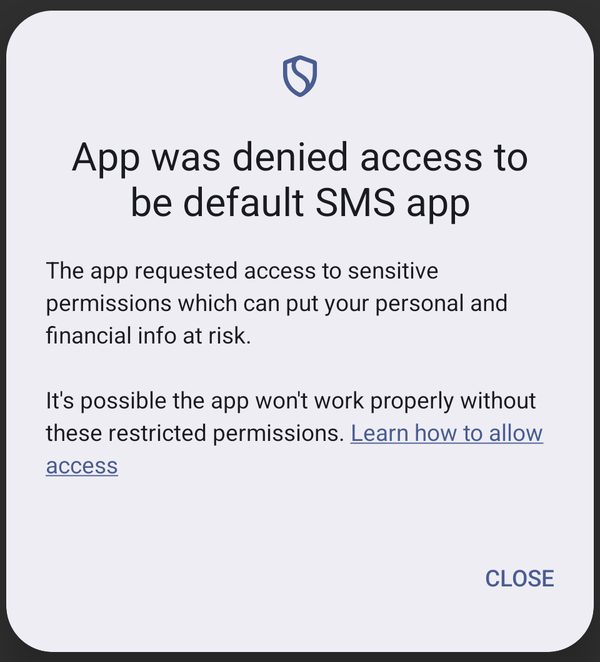
- Tap Close.
- Open your phone's Settings, tap Apps, then Hibbem. (Hibbem has a button that goes straight there.)
- On Hibbem's App info screen, tap ⋮ at the top right.
- Tap Allow restricted settings and confirm with your PIN or fingerprint.
- Go back to Hibbem and tap Set as default again.
Hibbem shows these steps itself as well: Not working? Here's how on its first screen, or Settings → Hibbem as your SMS app. On some phones the menus look different; then choose it by hand under Settings → Apps → Default apps → SMS app.
3. If Play Protect warns about texts
Later, Google Play Protect may send you a notification calling Hibbem a security risk, because an app from outside the Play Store can read texts and could forward them, for instance your bank's login codes. That's what an SMS app must be able to do: it's the job you gave it.
Hibbem never forwards your texts. It has no internet access at all, so it couldn't send anything anywhere even if it wanted to; you can see that under its app info, which lists no network permission. The only texts it sends by itself are pieces of encrypted messages to the person you're talking to, and unless you change that in its settings it asks you first.
To keep Hibbem, dismiss the warning and don't choose to uninstall. If Play Protect turned off Hibbem's permissions, open Hibbem and make it your SMS app again as in step 2.
Updates
From Google Play, updates come by themselves. From this site, download the file again and install it over the old one: your chats, keys and settings stay. Hibbem tells you when someone you text has a newer version.
Don't uninstall Hibbem to update it. Uninstalling deletes your identity and your encrypted messages. Before you ever do, write down your 24 words and make a backup (Hibbem → Your identity → Backups).